Keycaps Guide
Keycaps transform your keyboard’s look and feel. Understanding materials, profiles, and manufacturing processes helps you make informed choices.
Keycap Materials
PBT (Polybutylene Terephthalate) - Recommended
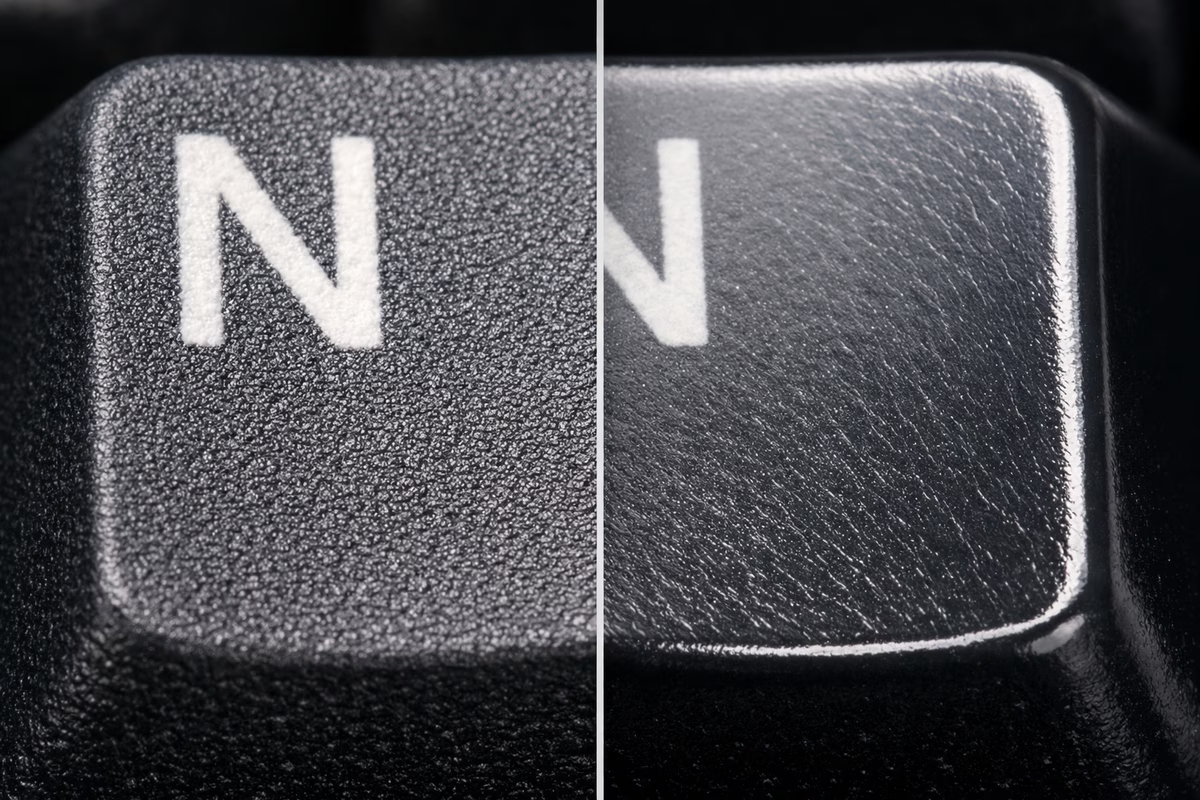
Characteristics:
- Textured, slightly rough feel
- Durable (resists shine for years)
- Thicker walls (1.4-1.5mm typical)
- Matte finish
- Slightly higher-pitched sound
Pros: ✅ No shine from finger oils (maintains look) ✅ Durable long-term ✅ Textured grip ✅ Resists yellowing from UV ✅ “Thocky” sound (if thick)
Cons: ❌ Limited color options (harder to dye) ❌ More expensive than ABS ❌ Fewer premium sets (GMK is ABS) ❌ Warping possible if poorly manufactured
Cost: $30-120 for full set
Best For:
- Long-term daily use
- Those who hate shiny keycaps
- Texture lovers
- Budget to mid-range builds
ABS (Acrylonitrile Butadiene Styrene)
Characteristics:
- Smooth, glossy feel
- Develops shine from use (6-12 months)
- Thinner walls (1.0-1.3mm typical)
- Vibrant colors possible
- Deeper, “clackier” sound
Pros: ✅ Vibrant colors (better dye saturation) ✅ Smooth feel (some prefer this) ✅ Premium sets (GMK, ePBT ABS) ✅ Easier to double-shot ✅ Thinner = lighter keypresses
Cons: ❌ Develops shine (looks worn) ❌ Less durable long-term ❌ Can yellow from UV exposure ❌ Feels cheap if thin
Cost: $20-300 (GMK sets premium)
Best For:
- Colorway collectors (GMK exclusives)
- Those who like smooth feel
- Short-term use (swap sets often)
- Premium enthusiast builds (GMK)
POM (Polyoxymethylene) - Specialty
Characteristics:
- Self-lubricating plastic
- Very smooth feel
- Translucent appearance
- Unique sound profile
Pros: ✅ Extremely smooth ✅ Unique aesthetic ✅ Interesting sound (different from PBT/ABS)
Cons: ❌ Very limited options ❌ Expensive ❌ Niche appeal
Cost: $50-100
Best For: Experimenters, collectors
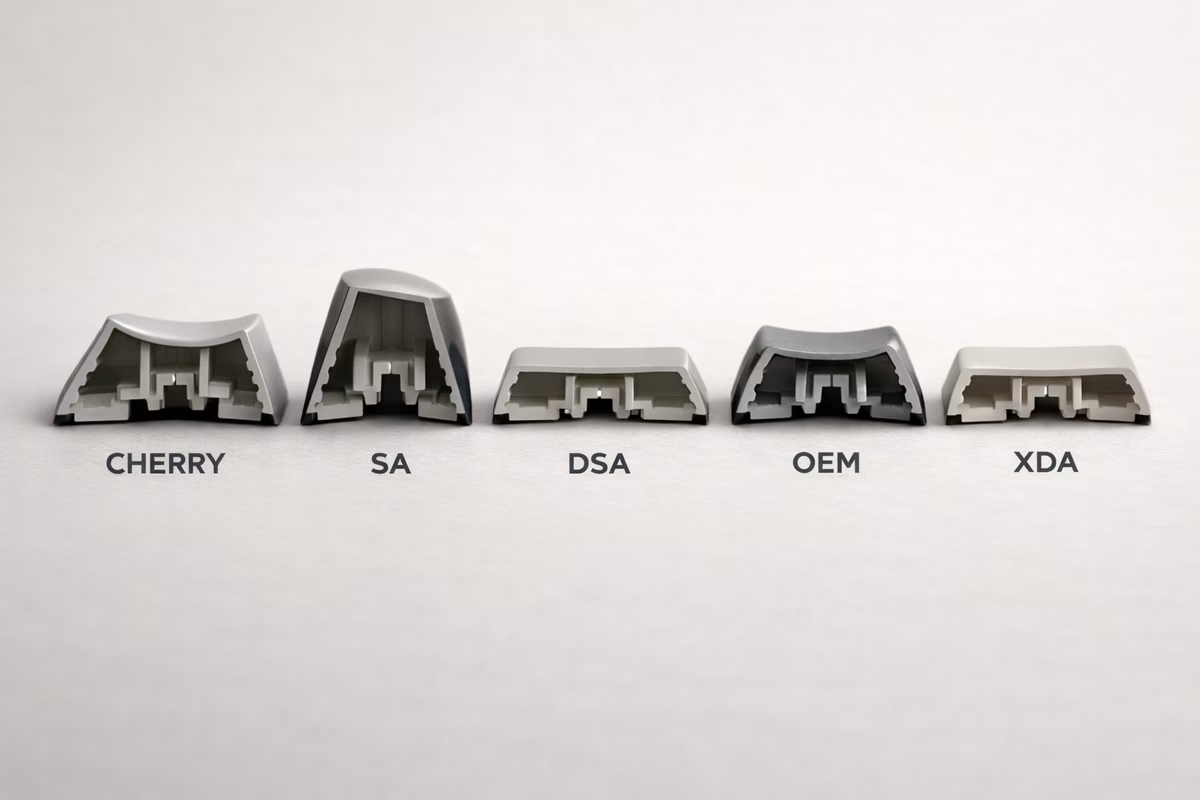
Keycap Profiles (Shape)
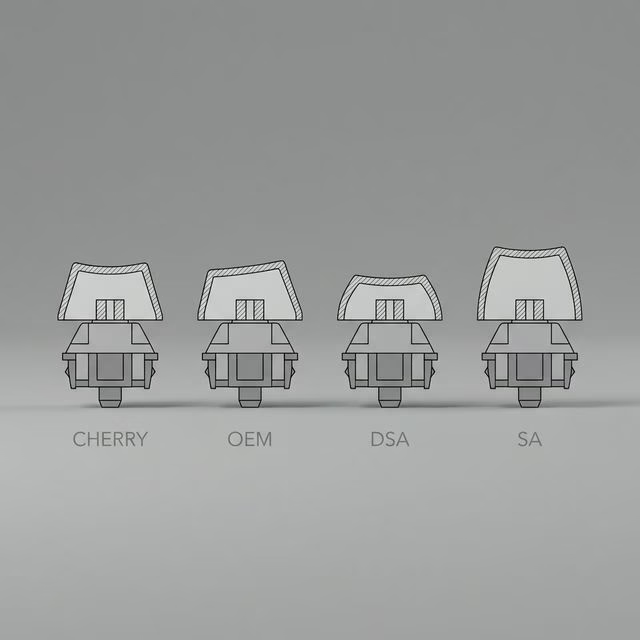
Cherry Profile - Most Popular
Height: Low (shortest modern profile) Shape: Sculpted (different height per row)
Characteristics:
- Row 1 (number row): Tallest
- Row 3 (home row): Shortest
- Low profile = less finger travel
- Angled tops for ergonomics
Pros: ✅ Most popular (huge selection) ✅ Low profile (comfortable) ✅ Works with all cases (low clearance) ✅ Widely available
Cons: ❌ Less dramatic than SA/MT3 ❌ Shorter may feel cramped (subjective)
Best For: Most users, first keycap set, balanced feel
Popular Sets:
- GMK (ABS, premium, $120-300)
- ePBT (PBT, good value, $60-120)
- NicePBT (PBT, affordable, $40-80)
OEM Profile - Stock Standard
Height: Medium Shape: Sculpted
Characteristics:
- Taller than Cherry
- Standard on most prebuilt keyboards
- Familiar feel for newcomers
Pros: ✅ Familiar (most people used this) ✅ Affordable ✅ Widely available
Cons: ❌ Taller = more finger travel ❌ Less premium feel vs. Cherry ❌ Fewer enthusiast options
Best For: Budget builds, those used to OEM
Popular Sets:
- HyperX Pudding (backlit, $25)
- Tai-Hao (colorful PBT, $40-60)
SA Profile - Tall & Retro
Height: Very tall (tallest common profile) Shape: Sculpted or uniform (R3 all rows)
Characteristics:
- Retro 1980s aesthetic
- Spherical tops (curved)
- Dramatic height difference between rows
- Unique “clacky” sound
Pros: ✅ Unique retro look ✅ Satisfying sound ✅ Premium feel ✅ Nostalgic aesthetic
Cons: ❌ Tall = more finger travel (can fatigue) ❌ Learning curve (adjustment period) ❌ May not fit low-profile cases ❌ Expensive
Cost: $80-200
Best For: Retro enthusiasts, aesthetic builds, SA lovers
Popular Sets:
- Signature Plastics SA (original, $100-180)
- MaxKey SA (affordable clone, $50-80)
DSA / XDA Profile - Uniform & Flat
Height: Low-medium Shape: Uniform (all keys same height)
Characteristics:
- All rows identical height
- Spherical tops
- No sculpting
Pros: ✅ Rearrange keys easily (uniform) ✅ Ortholinear-friendly ✅ Unique typing feel ✅ Affordable
Cons: ❌ Less ergonomic (no sculpting) ❌ Takes adjustment ❌ Less popular (fewer options)
Best For: Ortholinear keyboards, experimenters
KAT Profile - Medium Sculpted
Height: Between Cherry and SA Shape: Sculpted, spherical tops
Characteristics:
- Retro feel, modern height
- Comfortable sculpting
- Spherical tops like SA
Pros: ✅ Best of Cherry and SA ✅ Comfortable height ✅ Unique feel
Cons: ❌ Limited availability ❌ Long group buy waits ❌ Expensive
Cost: $100-150
MT3 Profile - Ergonomic & Deep
Height: Tall Shape: Deeply sculpted, “scooped” tops
Characteristics:
- Deep dish tops (fingers nestle in)
- Ergonomic sculpting
- High-profile look
- Created by Matt3o
Pros: ✅ Extremely ergonomic ✅ Unique typing feel (fingers locked in) ✅ Loud, satisfying sound
Cons: ❌ Adjustment period required ❌ Love it or hate it (divisive) ❌ May not fit low-profile cases ❌ Limited colorways
Cost: $60-120
Best For: Typists seeking maximum ergonomics
Popular Sets:
- Drop MT3 Susuwatari ($100)
- Drop MT3 White-on-Black ($75)
Keycap Legend Techniques
Double-Shot Molding - Best Durability
Process: Two plastics molded together (one for cap, one for legend)
Pros: ✅ Legends NEVER fade (part of structure) ✅ Most durable ✅ Crisp, clear legends
Cons: ❌ More expensive ❌ Limited color combos (two-color only)
Examples: GMK, ePBT, most premium sets
Dye-Sublimation - PBT Standard
Process: Dye absorbed into keycap under heat/pressure
Pros: ✅ Doesn’t fade (dye absorbed) ✅ Works great on PBT ✅ Multi-color designs possible ✅ Affordable
Cons: ❌ Legends must be darker than base (can’t do white on black well) ❌ Slightly less crisp than double-shot
Examples: Most PBT sets (ePBT, Domikey, NicePBT)
Laser Engraved / Etched
Process: Laser burns legend into keycap surface
Pros: ✅ Cheap to produce ✅ Any color combination
Cons: ❌ Legends fade over time (shallow etch) ❌ Less durable ❌ Budget aesthetic
Examples: Cheap Amazon sets
Pad Printed
Process: Legend printed on surface (like a stamp)
Pros: ✅ Cheap
Cons: ❌ Legends rub off (worst durability) ❌ Very budget
Examples: Cheapest keyboards, avoid if possible
Keycap Compatibility
Standard ANSI Layout
Most common US layout. Most keycap sets support this.
Bottom Row:
- 1.25u Ctrl, Win, Alt (left)
- 6.25u Spacebar
- 1.25u Alt, Win, Menu, Ctrl (right)
If your keyboard has standard ANSI: Almost any keycap set works!
Non-Standard Layouts
Common Non-Standard Bottom Rows:
- Gaming keyboards (Corsair, Razer): Weird spacebar sizes
- Some 65%: 1.75u right shift
- 40% keyboards: Need many 1u keys
Always check:
- Keyboard’s layout (especially bottom row)
- Keycap set compatibility list
Sets with Good Compatibility:
- Most ePBT sets (many kits)
- GMK Base + Spacebars kit
- XDA/DSA uniform sets (easy rearranging)
Stabilizer Compatibility
Costar vs. Cherry Stabilizers:
- Most modern boards use Cherry-style (keycap compatible)
- Costar stabilizers need specific keycap design (rare now)
Check: If you have Costar stabs, confirm keycaps compatible (most modern sets are Cherry-compatible only)
Choosing Your First Keycap Set
Considerations
1. Profile → Start with Cherry or OEM (familiar, comfortable)
2. Material → PBT for longevity, ABS if you want GMK colorway
3. Color → What matches your desk/aesthetic?
4. Budget → $40-80 = good PBT sets → $80-150 = premium PBT or mid GMK → $150-300 = GMK group buy
5. Compatibility → Check your keyboard layout (especially bottom row!)
Budget Recommendations ($30-60)
Best Value PBT:
- NicePBT ($40-60) - excellent quality/price
- Akko keycaps ($40-50) - good colors
- YMDK keycaps ($30-50) - budget PBT
Backlit (Shine-Through):
- HyperX Pudding ($25) - gaming aesthetic
- Glorious Aura ($30) - RGB shine-through
Mid-Range Recommendations ($60-120)
PBT:
- ePBT ($70-110) - fantastic quality
- Domikey ($60-90) - thick PBT, great colors
- DROP + MiTO sets ($80-100)
ABS:
- GMK Clones ($60-80) - Cherry profile, ABS
- Milkyway ($50-70) - good ABS alternative
Premium Recommendations ($120-300)
GMK (ABS, Double-Shot):
- GMK sets ($150-250 group buy, $200-400 aftermarket)
- Cherry profile, premium ABS
- Iconic colorways
- Long group buy waits (6-18 months)
Why GMK Expensive?
- Made in Germany
- Premium double-shot ABS
- Limited runs
- High demand
- Aftermarket speculation (annoying but real)
Artisan Keycaps
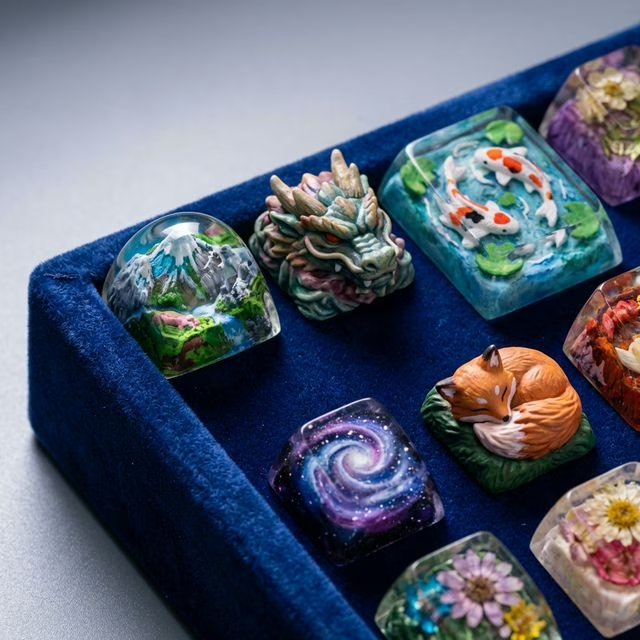
What Are Artisans? Hand-crafted keycaps (usually Esc or Enter), often resin-cast.
Characteristics:
- Unique designs (dragons, skulls, landscapes)
- Collectible (limited runs)
- Expensive ($30-300 per single keycap!)
Popular Artisan Makers:
- Jelly Key (landscapes, resin art)
- RAMA (minimalist metal)
- Dwarf Factory (cute designs)
- Keyforge (fantasy creatures)
Worth It? If you love the design and can afford it! Purely aesthetic (adds personality).
Cleaning & Maintenance
Regular Cleaning
Frequency: Every 1-3 months
Process:
- Remove keycaps (use keycap puller!)
- Soak in warm soapy water (15-30 min)
- Scrub gently with soft brush
- Rinse thoroughly
- Dry completely (24 hours)
- Reinstall
Never: ❌ Use alcohol on pad-printed legends (removes them) ❌ Use abrasive cleaners (scratches) ❌ Put in dishwasher (warps keycaps)
Shine Removal (ABS)
Reality Check: You can’t truly remove shine (plastic degradation).
Options:
- Accept it (many love the look!)
- Replace keycaps
- Use PBT next time
Keycap Sound
Keycaps affect sound significantly:
Thicker keycaps = Deeper, “thockier” sound Thinner keycaps = Higher-pitched, “clackier” sound
Material:
- PBT = Higher pitch, textured sound
- ABS = Lower pitch, smoother sound
Profile:
- SA = Deep, clacky
- Cherry = Balanced, thocky (if thick)
- OEM = Higher-pitched
Sound Preference: Entirely subjective! Try different sets.
Group Buys vs. In-Stock
Group Buys (GB)
How It Works:
- Designer creates keycap set renders
- Group buy runs for 3-4 weeks
- Manufacturer produces based on orders
- Ships 6-18 months later
Pros: ✅ Exclusive colorways ✅ Support designers ✅ Lower price vs. aftermarket
Cons: ❌ Long wait (6-18 months!) ❌ Can’t see product before buying ❌ Risk of delays or quality issues
In-Stock Sets
How It Works: Buy now, ships immediately (or within days)
Pros: ✅ Instant gratification ✅ See reviews first ✅ No waiting
Cons: ❌ Fewer colorway options ❌ Sometimes higher price
Recommendation: Buy in-stock for first set. Try group buys once you’re committed to hobby.
Common Mistakes
Mistake #1: Not Checking Compatibility
→ Always verify keycap set supports your layout (especially non-standard bottom rows!)
Mistake #2: Buying Cheap Pad-Printed Sets
→ Legends rub off in weeks. Spend $40+ for dye-sub or double-shot.
Mistake #3: Jumping to SA Profile First
→ Tall profiles have adjustment period. Start Cherry/OEM.
Mistake #4: Expecting GMK Quality from $30 Set
→ Budget sets are fine! But don’t expect GMK-tier thickness/legends.
Mistake #5: Not Considering Shine
→ If you hate shiny keycaps, get PBT (not ABS!).
Keycap Recommendations by Use Case
Gaming
→ OEM or Cherry profile, backlit legends (if RGB) → HyperX Pudding ($25), Glorious Aura ($30)
Typing / Office
→ Cherry or MT3 profile, muted colors, PBT → ePBT ($70-110), NicePBT ($40-60)
Aesthetic / Show Build
→ GMK colorway (group buy or aftermarket) → GMK sets ($150-300), unique colorways
Budget Build
→ PBT dye-sub, Cherry or OEM profile → YMDK ($30-50), Akko ($40-50)
Takeaway
The best keycaps:
- Match your keyboard layout
- Fit your budget
- Look aesthetically pleasing to YOU
- Feel comfortable to type on
Start with:
- PBT Cherry profile in neutral color ($40-80)
- Confirm compatibility with your keyboard
- Experiment with other profiles/colors later!
Keycaps are fun to swap. You’ll probably collect multiple sets (it’s a slippery slope!).
Next Steps
- Building Guide - Assemble your keyboard with new keycaps
- Maintenance Guide - Keep keycaps clean
- Switch Guide - Pair switches with keycaps for best sound