
Keycaps Guide
Keycaps change how a keyboard looks and feels. Materials, profiles, and legends all make a difference.
Keycap Materials
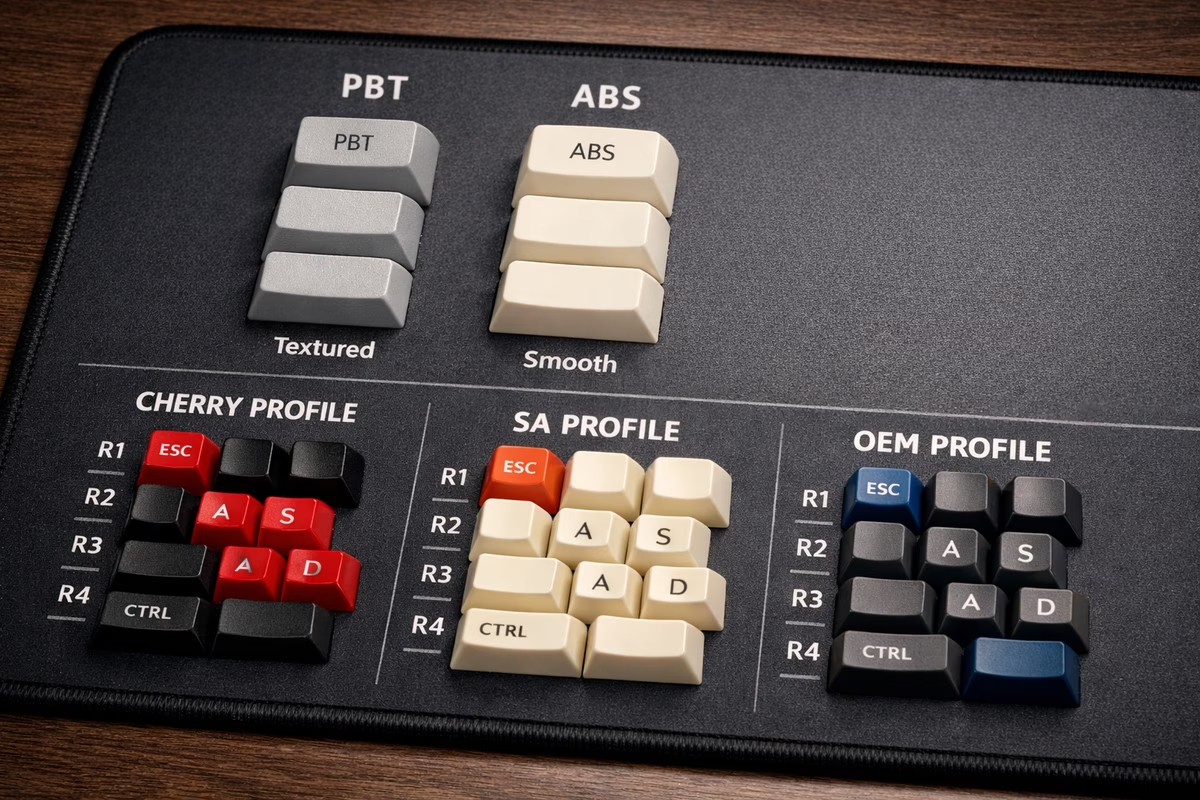
PBT (Polybutylene Terephthalate) - Recommended
Characteristics:
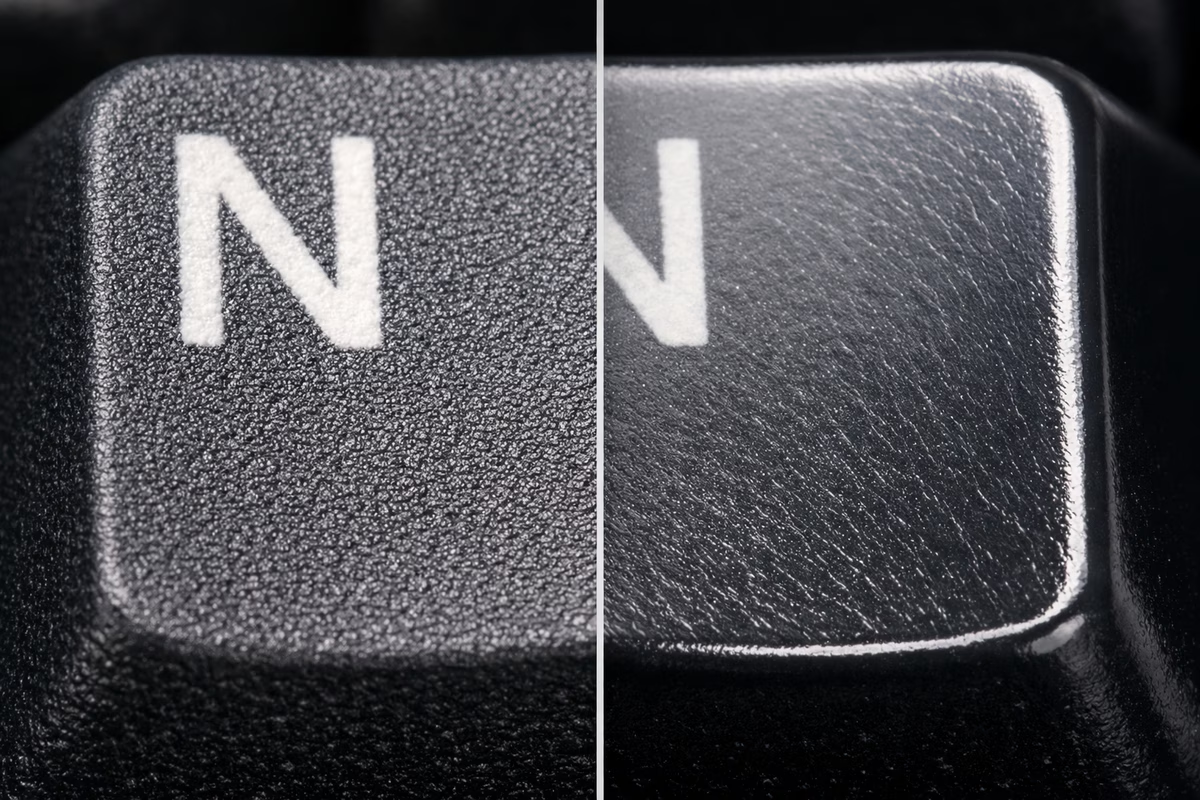
- Textured, slightly rough feel
- Durable (resists shine for years)
- Thicker walls (1.4-1.5mm typical)
- Matte finish
- Slightly higher-pitched sound
Pros: ✅ No shine from finger oils (maintains look) ✅ Durable long-term ✅ Textured grip ✅ Resists yellowing from UV ✅ “Thocky” sound (if thick)
Cons: ❌ Limited color options (harder to dye) ❌ More expensive than ABS ❌ Fewer premium sets (GMK is ABS) ❌ Warping possible if poorly manufactured
Cost: $30-120 for full set
Best For:
- Long-term daily use
- Those who hate shiny keycaps
- Texture lovers
- Budget to mid-range builds
ABS (Acrylonitrile Butadiene Styrene)
Characteristics:
- Smooth, glossy feel
- Develops shine from use (6-12 months)
- Thinner walls (1.0-1.3mm typical)
- Vibrant colors possible
- Deeper, “clackier” sound
Pros: ✅ Vibrant colors (better dye saturation) ✅ Smooth feel (some prefer this) ✅ Premium sets (GMK, ePBT ABS) ✅ Easier to double-shot ✅ Thinner = lighter keypresses
Cons: ❌ Develops shine (looks worn) ❌ Less durable long-term ❌ Can yellow from UV exposure ❌ Feels cheap if thin
Cost: $20-300 (GMK sets premium)
Best For:
- Colorway collectors (GMK exclusives)
- Those who like smooth feel
- Short-term use (swap sets often)
- Premium enthusiast builds (GMK)
POM (Polyoxymethylene) - Specialty
Characteristics:
- Self-lubricating plastic
- Very smooth feel
- Translucent appearance
- Unique sound profile
Pros: ✅ Extremely smooth ✅ Unique aesthetic ✅ Interesting sound (different from PBT/ABS)
Cons: ❌ Very limited options ❌ Expensive ❌ Niche appeal
Cost: $50-100
Best For: Experimenters, collectors
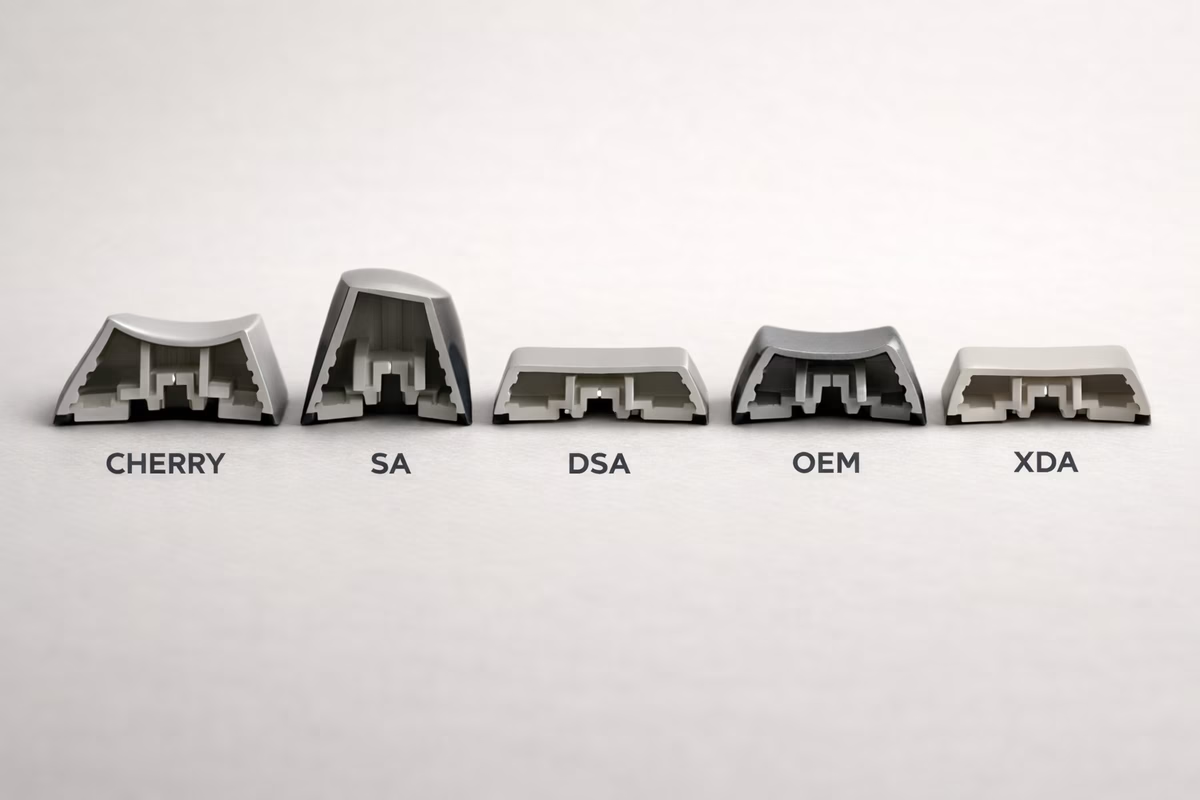
Keycap Profiles (Shape)
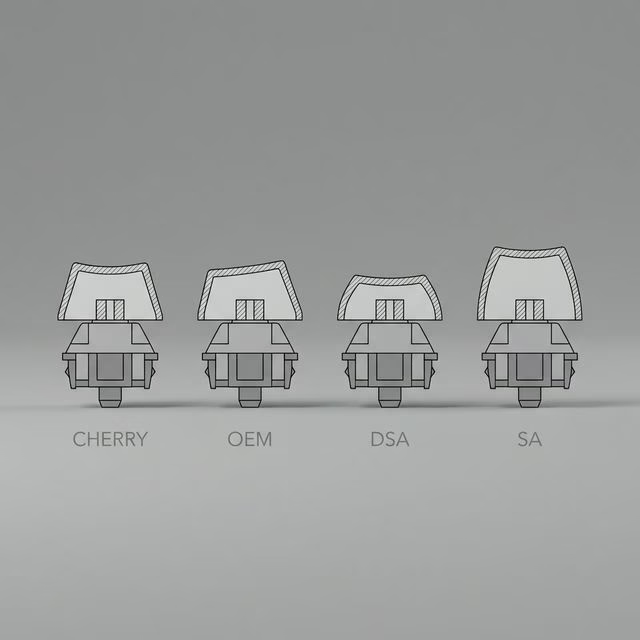
Cherry Profile - Most Popular
Height: Low (shortest modern profile) Shape: Sculpted (different height per row)
Characteristics:
- Row 1 (number row): Tallest
- Row 3 (home row): Shortest
- Low profile = less finger travel
- Angled tops for ergonomics
Pros: ✅ Most popular (huge selection) ✅ Low profile (comfortable) ✅ Works with all cases (low clearance) ✅ Widely available
Cons: ❌ Less dramatic than SA/MT3 ❌ Shorter may feel cramped (subjective)
Best For: Most users, first keycap set, balanced feel
Popular Sets:
- GMK (ABS, premium, $120-300)
- ePBT (PBT, good value, $60-120)
- NicePBT (PBT, affordable, $40-80)
OEM Profile - Stock Standard
Height: Medium Shape: Sculpted
Characteristics:
- Taller than Cherry
- Standard on most prebuilt keyboards
- Familiar feel for newcomers
Pros: ✅ Familiar (most people used this) ✅ Affordable ✅ Widely available
Cons: ❌ Taller = more finger travel ❌ Less premium feel vs. Cherry ❌ Fewer enthusiast options
Best For: Budget builds, those used to OEM
Popular Sets:
- HyperX Pudding (backlit, $25)
- Tai-Hao (colorful PBT, $40-60)
SA Profile - Tall & Retro
Height: Very tall (tallest common profile) Shape: Sculpted or uniform (R3 all rows)
Characteristics:
- Retro 1980s aesthetic
- Spherical tops (curved)
- Dramatic height difference between rows
- Unique “clacky” sound
Pros: ✅ Unique retro look ✅ Satisfying sound ✅ Premium feel ✅ Nostalgic aesthetic
Cons: ❌ Tall = more finger travel (can fatigue) ❌ Learning curve (adjustment period) ❌ May not fit low-profile cases ❌ Expensive
Cost: $80-200
Best For: Retro enthusiasts, aesthetic builds, SA lovers
Popular Sets:
- Signature Plastics SA (original, $100-180)
- MaxKey SA (affordable clone, $50-80)
DSA / XDA Profile - Uniform & Flat
Height: Low-medium Shape: Uniform (all keys same height)
Characteristics:
- All rows identical height
- Spherical tops
- No sculpting
Pros: ✅ Rearrange keys easily (uniform) ✅ Ortholinear-friendly ✅ Unique typing feel ✅ Affordable
Cons: ❌ Less ergonomic (no sculpting) ❌ Takes adjustment ❌ Less popular (fewer options)
Best For: Ortholinear keyboards, experimenters
KAT Profile - Medium Sculpted
Height: Between Cherry and SA Shape: Sculpted, spherical tops
Characteristics:
- Retro feel, modern height
- Comfortable sculpting
- Spherical tops like SA
Pros: ✅ Best of Cherry and SA ✅ Comfortable height ✅ Unique feel
Cons: ❌ Limited availability ❌ Long group buy waits ❌ Expensive
Cost: $100-150
MT3 Profile - Ergonomic & Deep
Height: Tall Shape: Deeply sculpted, “scooped” tops
Characteristics:
- Deep dish tops (fingers nestle in)
- Ergonomic sculpting
- High-profile look
- Created by Matt3o
Pros: ✅ Extremely ergonomic ✅ Unique typing feel (fingers locked in) ✅ Loud, satisfying sound
Cons: ❌ Adjustment period required ❌ Love it or hate it (divisive) ❌ May not fit low-profile cases ❌ Limited colorways
Cost: $60-120
Best For: Typists seeking maximum ergonomics
Popular Sets:
- Drop MT3 Susuwatari ($100)
- Drop MT3 White-on-Black ($75)
Keycap Legend Techniques
Double-Shot Molding - Best Durability
Process: Two plastics molded together (one for cap, one for legend)
Pros: ✅ Legends NEVER fade (part of structure) ✅ Most durable ✅ Crisp, clear legends
Cons: ❌ More expensive ❌ Limited color combos (two-color only)
Examples: GMK, ePBT, most premium sets
Dye-Sublimation - PBT Standard
Process: Dye absorbed into keycap under heat/pressure
Pros: ✅ Doesn’t fade (dye absorbed) ✅ Works great on PBT ✅ Multi-color designs possible ✅ Affordable
Cons: ❌ Legends must be darker than base (can’t do white on black well) ❌ Slightly less crisp than double-shot
Examples: Most PBT sets (ePBT, Domikey, NicePBT)
Laser Engraved / Etched
Process: Laser burns legend into keycap surface
Pros: ✅ Cheap to produce ✅ Any color combination
Cons: ❌ Legends fade over time (shallow etch) ❌ Less durable ❌ Budget aesthetic
Examples: Cheap Amazon sets
Pad Printed
Process: Legend printed on surface (like a stamp)
Pros: ✅ Cheap
Cons: ❌ Legends rub off (worst durability) ❌ Very budget
Examples: Cheapest keyboards, avoid if possible
Keycap Compatibility
Standard ANSI Layout
Most common US layout. Most keycap sets support this.
Bottom Row:
- 1.25u Ctrl, Win, Alt (left)
- 6.25u Spacebar
- 1.25u Alt, Win, Menu, Ctrl (right)
If your keyboard has standard ANSI: Almost any keycap set works!
Non-Standard Layouts
Common Non-Standard Bottom Rows:
- Gaming keyboards (Corsair, Razer): Weird spacebar sizes
- Some 65%: 1.75u right shift
- 40% keyboards: Need many 1u keys
Always check:
- Keyboard’s layout (especially bottom row)
- Keycap set compatibility list
Sets with Good Compatibility:
- Most ePBT sets (many kits)
- GMK Base + Spacebars kit
- XDA/DSA uniform sets (easy rearranging)
Stabilizer Compatibility
Costar vs. Cherry Stabilizers:
- Most modern boards use Cherry-style (keycap compatible)
- Costar stabilizers need specific keycap design (rare now)
Check: If you have Costar stabs, confirm keycaps compatible (most modern sets are Cherry-compatible only)
Choosing Your First Keycap Set
Considerations
1. Profile → Start with Cherry or OEM (familiar, comfortable)
2. Material → PBT for longevity, ABS if you want GMK colorway
3. Color → What matches your desk/aesthetic?
4. Budget → $40-80 = good PBT sets → $80-150 = premium PBT or mid GMK → $150-300 = GMK group buy
5. Compatibility → Check your keyboard layout (especially bottom row!)
Budget Recommendations ($30-60)
Best Value PBT:
- NicePBT ($40-60) - excellent quality/price
- Akko keycaps ($40-50) - good colors
- YMDK keycaps ($30-50) - budget PBT
Backlit (Shine-Through):
- HyperX Pudding ($25) - gaming aesthetic
- Glorious Aura ($30) - RGB shine-through
Mid-Range Recommendations ($60-120)
PBT:
- ePBT ($70-110) - fantastic quality
- Domikey ($60-90) - thick PBT, great colors
- DROP + MiTO sets ($80-100)
ABS:
- GMK Clones ($60-80) - Cherry profile, ABS
- Milkyway ($50-70) - good ABS alternative
Premium Recommendations ($120-300)
GMK (ABS, Double-Shot):
- GMK sets ($150-250 group buy, $200-400 aftermarket)
- Cherry profile, premium ABS
- Iconic colorways
- Long group buy waits (6-18 months)
Why GMK Expensive?
- Made in Germany
- Premium double-shot ABS
- Limited runs
- High demand
- Aftermarket speculation (annoying but real)
Artisan Keycaps
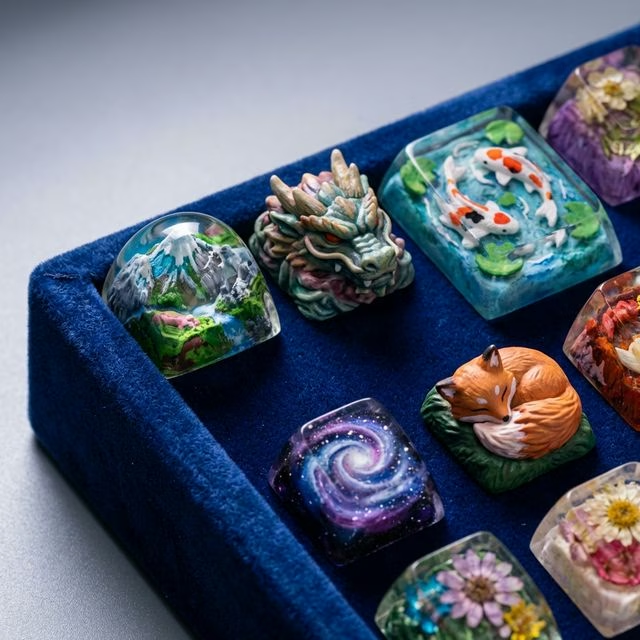
What Are Artisans? Hand-crafted keycaps (usually Esc or Enter), often resin-cast.
Characteristics:
- Unique designs (dragons, skulls, landscapes)
- Collectible (limited runs)
- Expensive ($30-300 per single keycap!)
Popular Artisan Makers:
- Jelly Key (landscapes, resin art)
- RAMA (minimalist metal)
- Dwarf Factory (cute designs)
- Keyforge (fantasy creatures)
Worth It? If you love the design and can afford it! Purely aesthetic (adds personality).
Cleaning & Maintenance
Regular Cleaning
Frequency: Every 1-3 months
Process:
- Remove keycaps (use keycap puller!)
- Soak in warm soapy water (15-30 min)
- Scrub gently with soft brush
- Rinse thoroughly
- Dry completely (24 hours)
- Reinstall
Never: ❌ Use alcohol on pad-printed legends (removes them) ❌ Use abrasive cleaners (scratches) ❌ Put in dishwasher (warps keycaps)
Shine Removal (ABS)
Reality Check: You can’t truly remove shine (plastic degradation).
Options:
- Accept it (many love the look!)
- Replace keycaps
- Use PBT next time
Keycap Sound
Keycaps affect sound significantly:
Thicker keycaps = Deeper, “thockier” sound Thinner keycaps = Higher-pitched, “clackier” sound
Material:
- PBT = Higher pitch, textured sound
- ABS = Lower pitch, smoother sound
Profile:
- SA = Deep, clacky
- Cherry = Balanced, thocky (if thick)
- OEM = Higher-pitched
Sound Preference: Entirely subjective! Try different sets.
Group Buys vs. In-Stock
Group Buys (GB)
How It Works:
- Designer creates keycap set renders
- Group buy runs for 3-4 weeks
- Manufacturer produces based on orders
- Ships 6-18 months later
Pros: ✅ Exclusive colorways ✅ Support designers ✅ Lower price vs. aftermarket
Cons: ❌ Long wait (6-18 months!) ❌ Can’t see product before buying ❌ Risk of delays or quality issues
In-Stock Sets
How It Works: Buy now, ships immediately (or within days)
Pros: ✅ Instant gratification ✅ See reviews first ✅ No waiting
Cons: ❌ Fewer colorway options ❌ Sometimes higher price
Recommendation: Buy in-stock for first set. Try group buys once you’re committed to hobby.
Common Mistakes
Mistake #1: Not Checking Compatibility
→ Always verify keycap set supports your layout (especially non-standard bottom rows!)
Mistake #2: Buying Cheap Pad-Printed Sets
→ Legends rub off in weeks. Spend $40+ for dye-sub or double-shot.
Mistake #3: Jumping to SA Profile First
→ Tall profiles have adjustment period. Start Cherry/OEM.
Mistake #4: Expecting GMK Quality from $30 Set
→ Budget sets are fine! But don’t expect GMK-tier thickness/legends.
Mistake #5: Not Considering Shine
→ If you hate shiny keycaps, get PBT (not ABS!).
Keycap Recommendations by Use Case
Gaming
→ OEM or Cherry profile, backlit legends (if RGB) → HyperX Pudding ($25), Glorious Aura ($30)
Typing / Office
→ Cherry or MT3 profile, muted colors, PBT → ePBT ($70-110), NicePBT ($40-60)
Aesthetic / Show Build
→ GMK colorway (group buy or aftermarket) → GMK sets ($150-300), unique colorways
Budget Build
→ PBT dye-sub, Cherry or OEM profile → YMDK ($30-50), Akko ($40-50)
Takeaway
The best keycaps:
- Match your layout
- Fit your budget
- Look good to you
- Feel comfortable to type on
Start with:
- PBT in Cherry profile in a neutral color
- Check compatibility first
- Try other profiles later
Keycaps are easy to swap. You will probably end up with more than one set.
Next Steps
- Building Guide - Assemble your keyboard with new keycaps
- Maintenance Guide - Keep keycaps clean
- Switch Guide - Pair switches with keycaps for best sound
Read the parts through use
After reading Keycaps Guide, bring the terms back to a keyboard you can touch. Sound, feel, height, stiffness, layout, and maintenance are easier to understand through a real board than through a parts list alone. A term becomes useful when it explains something your fingers or ears already noticed.
Change one detail at a time when experimenting. A different keycap profile, plate, foam layer, switch, stabilizer tune, or desk mat can all affect the result, but changing everything at once makes the lesson disappear.
Keep short notes on what changed and what did not. The keyboard hobby rewards memory less than people expect. A small note can prevent repeating the same expensive experiment.
The goal is not to collect vocabulary for its own sake. It is to build and maintain a keyboard that feels better in daily work.
Practice notes for this page
Pick three entries or ideas from Keycaps Guide and connect each one to something concrete. One might change what you buy, one might change what you notice, and one might simply give a better name to a thing you already understood.
Then say each idea in your own words. If the explanation becomes shorter and clearer, the page is doing its job. If it becomes more confusing, follow the term into a fuller guide before relying on it.
Use the page again after a real experience. A tasting, build, purchase, recipe, pour, service visit, or design decision will make some definitions feel obvious and reveal others that need more context.
This back-and-forth keeps reference material from becoming a static list. The entries become useful when they help you act with more care, ask a better question, or describe an experience more accurately.