Mechanical Keyboards: 30-Minute Quickstart
Tired of mushy membrane keyboards? This quickstart gives you enough real-world knowledge to buy your first mechanical keyboard confidently—without falling into the rabbit hole of endless switch reviews and “perfect build” fantasies.
Mechanical keyboards can be a hobby, but they don’t have to be. You can treat your first board as a tool upgrade: better feel, better durability, and a layout that matches how you actually work.
Minute 1–5: What makes a mechanical keyboard different
A mechanical keyboard has an individual switch under each key. That sounds small, but it changes everything: you get consistent feel, consistent actuation, and components you can often replace.
Why people switch (and why they stay)
- Feel and feedback: the press can be smooth, bumpy, crisp, or silent.
- Durability: many switches are rated for tens of millions of presses.
- Consistency: keys feel more uniform than rubber domes.
- Repairability: on hot-swap boards, a failed switch can be replaced.
- Customization (optional): keycaps, layouts, programming, sound.
The most important truth: switch type matters more than brand. If you get the switch feel right, you can be happy on a modest board.
Minute 6–10: Layout sizes (choose with your workflow, not aesthetics)
Smaller isn’t “better.” Smaller is a trade.
The common layouts
- Full-size (100%): numpad included; great for data entry and spreadsheets; biggest footprint.
- TKL (80%): removes numpad; popular for gaming and better mouse ergonomics.
- 75%: compact but keeps the function row and arrows; a practical sweet spot.
- 65%: keeps arrows, drops the function row; great if you can live with a layer.
- 60%: most compact mainstream layout; higher learning curve (arrows and nav on layers).
How to decide in 30 seconds
Ask yourself:
- Do you use a numpad daily? If yes, don’t punish yourself.
- Do you use F-keys constantly? If yes, 75% or larger is easier.
- Do you need dedicated arrow keys? Many people do.
If you’re unsure, TKL or 75% is the safest first purchase.
Minute 11–15: Switch feel (the part you can’t “spec sheet” your way out of)
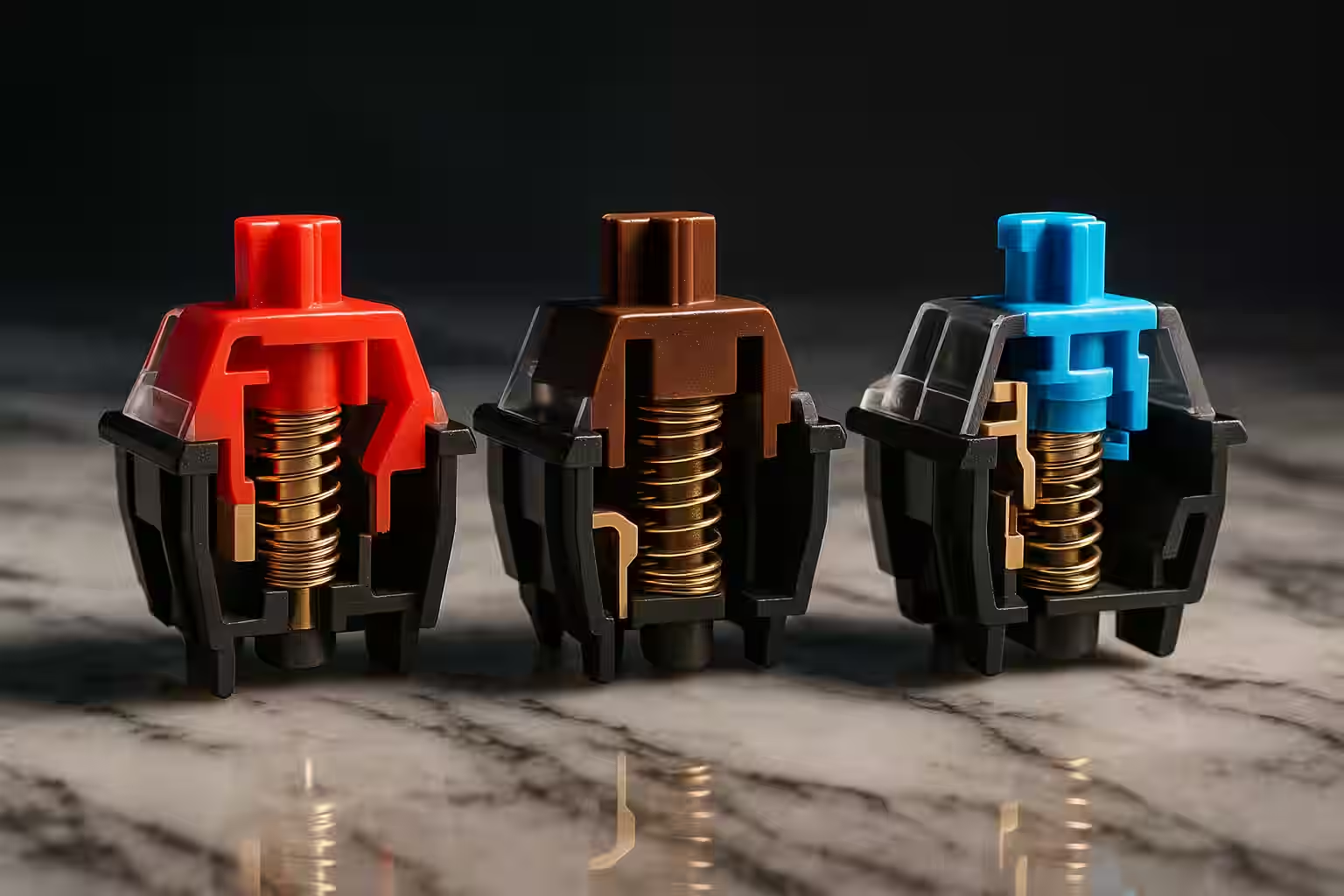
Switches are usually described by how they feel through the press:
Linear
Smooth press from top to bottom.
- Great for gaming and people who like effortless movement.
- Can feel “too easy” if you bottom out hard.
Tactile
A bump partway through the press.
- Good for mixed typing and work.
- Helps many people avoid accidental presses.
Clicky
A tactile bump plus an audible click mechanism.
- Satisfying for some.
- Loud enough to be socially expensive.
Two concepts that matter more than most people realize
Actuation vs bottom-out: a switch activates before the key hits the bottom. If you smash every key to the floor, you’re “bottoming out,” which can be tiring and loud. Many people learn to type lighter on mechanical boards over time.
Stabilizers: large keys (space, enter, shift) use stabilizers. Good stabilizers make the keyboard feel premium even with average switches. Rattly stabilizers can make an expensive board feel cheap.
Minute 16–20: Buying strategy (so you don’t waste money)
The beginner-friendly “don’t overthink it” spec list
If you want a first board that lets you learn what you like, prioritize:
- Hot-swap sockets (so you can try different switches later)
- Solid stabilizers (or a board known for decent stock stabs)
- Reasonable layout (TKL/75% if uncertain)
- PBT keycaps if possible (they resist shine)
- Simple programmability (QMK/VIA is a strong plus)
Hot-swap vs soldered (what it really means)
- Hot-swap: switches pop in/out without solder. Best for beginners, easy repairs.
- Soldered: more permanent, sometimes more “enthusiast” options, but requires tools/skill to change.
For a first board, hot-swap is the smart move.
Prebuilt vs custom (a calmer framing)
Prebuilt is for people who want to type now. Custom is for people who enjoy the build process itself.
A great beginner path is the hybrid:
- Buy a hot-swap prebuilt.
- Use it stock for a week.
- Change one thing at a time (switches, then caps, then sound mods if you care).
Minute 21–25: Sound and feel are a system
You don’t press “a switch.” You press a switch inside a keyboard.
What changes sound and feel:
- Case material and weight: metal cases often sound sharper; plastics can sound softer.
- Mounting style: gasket mounts can feel cushier; tray mounts can feel firmer.
- Plate material: metal plates can sound brighter; softer plates can sound deeper.
- Keycaps: thick PBT often sounds deeper than thin ABS.
- Desk and room: a hollow desk can amplify noise.
This is why the same switch can sound different in two boards.
Ergonomics (the part that matters after the honeymoon)
If you type for hours, comfort is worth more than novelty.
Angle, height, and fatigue
Many mechanical keyboards are taller than membrane boards. If your wrists bend upward while typing, you may feel fatigue.
Two easy fixes:
- Lower the keyboard angle (or remove tall feet).
- Add a wrist rest if it keeps your wrists neutral.
Layout ergonomics
Smaller layouts can improve mouse ergonomics because your hands sit closer together. But if you constantly reach for missing keys on layers, the mental overhead can outweigh the ergonomic gain.
If you’re a heavy shortcut user, 75% is often the best “compact but practical” layout.
Programming and layers (why QMK/VIA is a superpower)
Programmable boards let you adapt the keyboard to your habits instead of adapting your habits to the keyboard.
Common quality-of-life mappings:
- Put arrow keys on a convenient layer if you choose 60%/65%.
- Add media keys or brightness controls.
- Create app-specific shortcuts.
This is also why a smaller board can be viable: good layers make missing keys painless.
The beginner mod path (one thing at a time)
You don’t need to lube switches on day one. The fastest improvements usually come from reducing rattle and stabilizing the sound.
If you want to experiment, try this order:
- Stabilizer improvement (reduce rattle on space/enter)
- Keycaps (feel + sound change dramatically)
- Switch swap (only after you know what you dislike)
- Case foam/sound dampening (if the board sounds hollow)
Doing one change at a time teaches you what actually matters to your preferences.
One more practical note: if you’re unsure about switch weight, start lighter than you think. Many beginners assume heavier switches are “more premium,” but lighter switches often reduce fatigue for long typing sessions. You can always go heavier later once you know you want that resistance.
Minute 26–30: A practical action plan
Step 1: Decide what you’re optimizing for
- If you share space: prioritize quieter switches and decent stabilizers.
- If you game: prioritize layout ergonomics and consistent feel.
- If you type all day: prioritize comfort (tactile or lighter linear, plus good keycap profile).
Step 2: Touch real switches
A switch tester can help, but it’s not perfect. It teaches you “rough categories,” not the full experience. If you can, try a friend’s board or a local meetup.
Step 3: Buy a board you’ll actually use
Your first board is for learning. You can always swap switches later (if hot-swap) or upgrade keycaps. Don’t start with a $400 “endgame” board before you know what you like.
Common beginner questions (answered without gatekeeping)
“Do I need RGB?”
No. It can be fun, but it doesn’t improve typing feel.
“Cherry vs clones?”
Modern alternatives (Gateron, Kailh, and many others) can be excellent. Focus on the switch feel you want, not just the logo.
“Linear or tactile for my first keyboard?”
If you’re unsure, tactile is a safe all-purpose start. If you game primarily and want smoothness, start linear.
“Is 60% too small?”
For many beginners, yes. It’s not impossible, but it adds a layer-learning project on top of your new keyboard. 75% and TKL are easier first steps.
“Do I need a wrist rest?”
Not required, but many people find it improves comfort—especially with taller keycap profiles.
Confidence Builders
You Already Know Enough to: ✅ Choose between linear, tactile, and clicky switches ✅ Pick the right keyboard size for your needs ✅ Understand the difference between prebuilt and custom ✅ Identify good value vs. overpriced keyboards ✅ Avoid common beginner mistakes
You Don’t Need to: ❌ Understand every switch variant (300+ exist!) ❌ Build a custom keyboard immediately ❌ Spend $400 on your first board ❌ Lube switches or mod stabilizers (yet!) ❌ Learn to solder
Trust Your Hands: If it feels good to type on, it’s the right keyboard FOR YOU!
Quick Reference Card (Screenshot This!)
Switch Quick Guide
Want smooth, fast keypresses? → Linear (Cherry Red, Gateron Yellow)
Want feedback without noise? → Tactile (Cherry Brown, Boba U4T)
Want satisfying click sound? → Clicky (Cherry Blue, Kailh Box White)
Need office-quiet? → Silent (Cherry Silent Red, Boba U4 Silent)
Layout by Use Case
- Gaming + Numpad: Full-size (100%)
- Gaming, no numpad: TKL (80%)
- Balanced: 75%
- Compact + arrows: 65%
- Ultra-compact: 60%
Budget Sweet Spots
- Entry ($50-100): Learn basics, try switches
- Quality ($100-200): Best value, long-term use
- Enthusiast ($200-400): Premium experience
- Custom ($400+): Hobby-grade, diminishing returns
You’re Ready to Explore!
You now know: ✅ The three main switch types and their uses ✅ Keyboard layouts from 60% to full-size ✅ How to shop for value and avoid overpriced boards ✅ Prebuilt vs. custom decision making ✅ What to do next
Go forth and type! Mechanical keyboards are meant to be used and enjoyed. There are no wrong choices—only your preferences waiting to be discovered.
Questions? Dive deeper:
- Switch Guide - Deep dive into switch types
- Layout Guide - Size comparison and details
- Building Guide - When you’re ready to build
Remember: The best keyboard is the one YOU love to type on. Never let anyone tell you your preferences are “wrong.” Explore, experiment, and most importantly—enjoy every keystroke! ⌨️