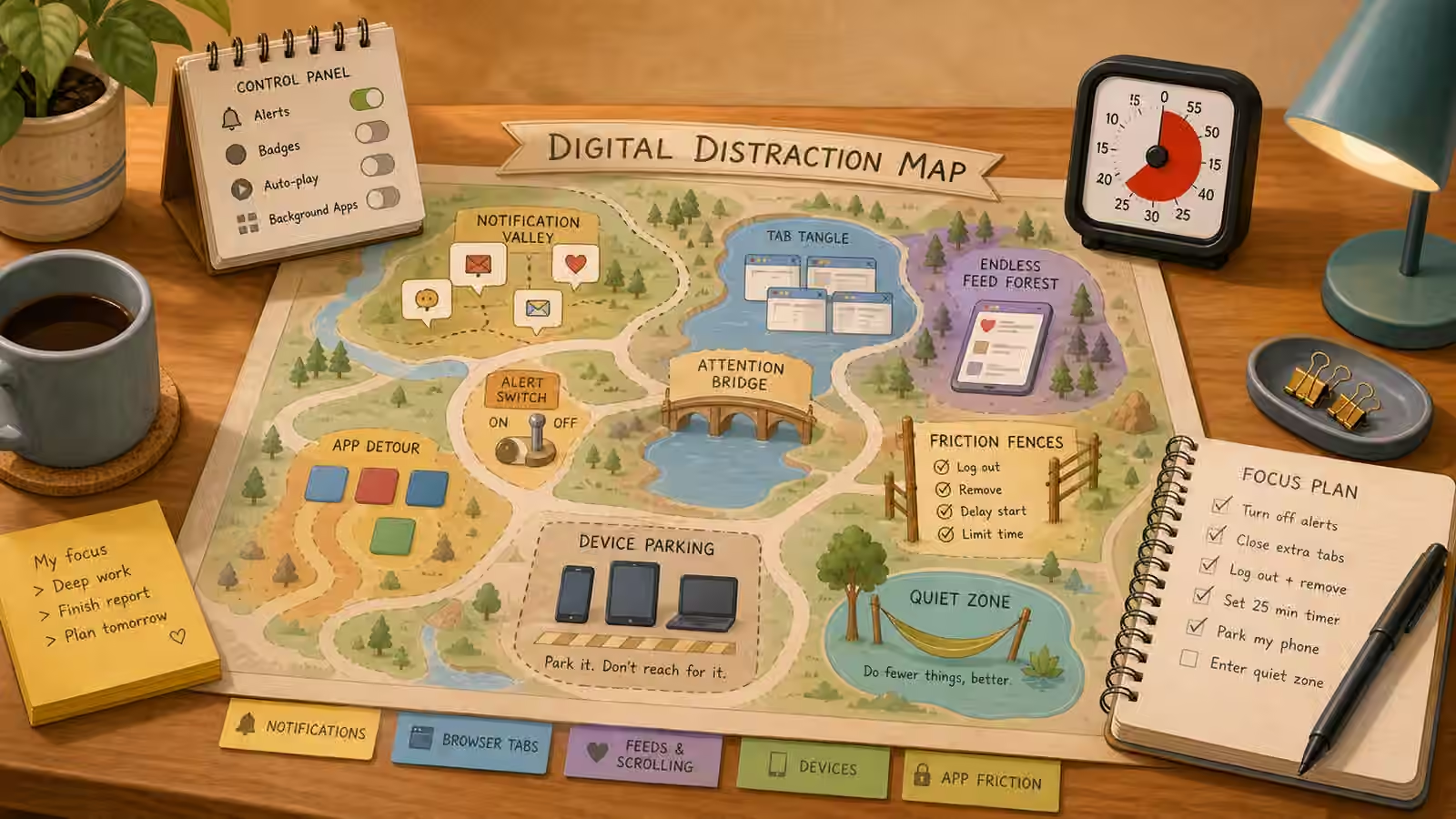
The trouble with fighting digital distraction is that we usually treat the phone or the browser as a single temptation to resist, when it is really a building full of doors. Some doors lead exactly where you need to go: the document, the portal, the calendar, the reference you are actually citing. Other doors lead to feeds, shops, messages, and games that quietly redirect the whole afternoon. Willpower against “the phone” is a losing fight because the phone is not one thing. Mapping is the alternative: instead of resisting the device in general, you find the specific doors that keep pulling you off the path and change how easy they are to open.
A distraction map is simply a record of where your attention actually leaves. You do not build it from imagination or guilt; you build it by watching one real work session and noting each moment you drifted. The map is honest in a way that resolutions never are, because it shows the exits you actually use rather than the ones you think you should worry about.
Drawing your first map
Sit down for one ordinary task on a screen and keep a scrap of paper beside you. Every time your attention leaves the task, make a quick mark and jot what pulled it: a notification banner, a moment of boredom at a hard paragraph, a flicker of uncertainty about what to do next, the dead air while a file loaded, or the small reward of checking something easy. Do not try to stop yourself; just record. After twenty minutes you will have a rough map of your real exits, and it will almost certainly surprise you. Most people discover that their biggest leak is not the obvious villain like social media but something quieter, like opening a new tab to “quickly look something up” and never coming back.
Once the exits are on paper, sort them into two kinds. Some doors are genuine tools for the task at hand: the search you actually needed, the reference, the shared document. Circle those. Others are pure detours that steal the start and give nothing back. Underline those. The same app can be either one depending on the moment, which is why blanket blocking so often backfires. The goal is not a locked-down device but a map where the useful doors are easy and the stealing doors are just inconvenient enough to give you a second of choice.
Understanding the triggers, not just the apps
A distraction is a two-part event: something inside you opens the door, and the app on the other side rewards you for it. The app is the obvious half, but the trigger is where the leverage is. Most drifts happen at predictable seams in the work: the moment right before a hard part, the wait while something loads, the small uncertainty about the next step, the boredom of a repetitive stretch. If you learn to recognize those seams, you can put something other than a feed on the other side of them. A hard paragraph coming up is a cue to write your next sentence badly rather than to check your phone; a loading screen is a cue to take a breath rather than to open a new tab.
This is why an app blocker installed in a fit of resolve usually disappoints. It treats the symptom without knowing the path. If your real exit is uncertainty at hard moments, a blocker just leaves you sitting in the uncertainty with nowhere to go, and you will find a door it did not cover. Map first, then decide what friction actually fits the leak you found.
Choosing friction that fits
Once you know a door and its trigger, you have a small menu of ways to change it. You can silence it, so its notifications stop reaching in and starting the drift for you. You can move it, so the app lives on a different screen, a different device, or in a folder that takes an extra deliberate tap. You can block it during defined start rounds. You can close it, so the tempting tabs are not sitting open beside your work. You can pin the useful things so they are the easy ones to reach. You can separate contexts, so the browser window you work in holds only the task and a second window holds the interesting links you will read later. Or you can schedule it, giving the feed a real slot in the day so it stops nagging for attention it will get anyway.
The point is to match one specific friction to one specific door, not to overhaul everything at once. A student might keep the school portal pinned and easy while parking social apps in a timed folder that only opens during breaks. A worker might keep one browser window strictly for the task and drop every interesting link into a separate “read later” list so no link ever decides the next hour. A parent might write the grocery list on paper before opening the shopping app, so the app fills a decision that has already been made instead of making it for them.
Keeping the map alive
A distraction map is not a one-time cleanup; it is a habit of noticing. Your exits change with your mood, your workload, and whatever new thing has captured the culture this month. A single distracted day is not evidence that the system failed; it is just a new data point about a seam you had not mapped yet. When a day goes sideways, the useful response is not to abandon the whole approach but to ask which door opened and what triggered it, then adjust that one thing. Over time the map becomes less a document you keep and more a sense you carry, so that you notice the pull toward an exit early enough to choose otherwise.
It also helps to build a clean way back after any break. Before you touch the device for a legitimate pause, write down the return point: the exact next move you will make when you sit back down. That single sentence is what lets you leave the task safely and re-enter it without a reconstruction effort, which is often the hardest part of getting going again.
A careful next step
If your relationship with screens feels compulsive, unsafe, financially harmful, or bound up with serious problems in mood, sleep, school, or work, these setup changes can help at the edges but should not stand in for qualified support. For everyday practice, map one task, move one stealing door a little farther away, make one useful door a little closer, and write your return point before you step away. For related setups, see The Shutdown Routine for parking tabs and capturing next steps, and Reality Check Desk for weighing the productivity claims that focus apps like to make.